The following items are used for Course Coordinators.This handbook was revised on Nov. 25, 2019.
Forms
Course Title:
Course Session Dates:
Time:
Course Location:
Current Number of Registrants:
The PC Volunteer completes this form for the course they are coordinating, then emails it to Ann Smith in UHart Public Safety at ansmith@hartford.edu.
She will respond by emailing a Parking Permit. The PC Volunteer attaches the Parking Permit to Welcome Letter emails sent out to registrants (and to the instructor, if non-UHart faculty).
Technical Equipment by Room
- Dell PC Desktop (in the wooden podium stand) with 4 USB slots, and a combo CD-RW/DVD-RW slot
- Software loaded: Excel 2016, Word 2016, PowerPoint 2016, Access 2016, Publisher 2016, VLC Media. Internet access is included.
- SMART Monitor 10.5" x 17“ approx. (with USB slots)
- Hard-wired keyboard and mouse
- PowerPoint Remote
- Computer Projector (mounted on ceiling) with remote on/off
- Powered Speakers
- Stand Alone Toshiba SD-V296 DVD/VCR combo (in the podium stand)
- Sony BluRay DVD player (in the podium bottom cabinet)
- Projector Screen (ceiling mounted)
- Transparency Projector
- USB webcam
- Whiteboards behind wooden sliders in front of room, dry erase markers
- Wired Microphone
Also available:
- Adaptor for Mac equipment, does not work on all models
- Lapel Microphone
- PC Laptop
- Speakerphone
- Turning point clickers
- Podium, chairs, music stands, piano lights (2), and speakers are available. There is a projector screen. PC laptop can be provided, as well as adaptor for Mac equipment (does not work on all models). Microphone included on podium or arrange for lapel microphone(s).
Normally an A/V assistant remains in booth at rear of auditorium during the class. If not, A/V office is located in hallway across from auditorium.
- SMART podium similar to that in KF Room with software, monitor, DVD, etc.
- Whiteboards in front of room, dry erase markers
- Built-in microphone (no need to request lapel microphone).
- Podium (not SMART) at front of lecture space with ceiling-mounted projector screen.
The lecture space has tables and chairs arranged in rows. For classes larger than 49 participants, check with Randi Ashton-Pritting concerning set up.
Review room set-up with Randi Ashton-Pritting of designated contact at 1877 Club.
Request she coordinate with A/V for necessary equipment, including a computer and/or Mac adaptor if instructor is not bringing his/her/their own. A/V must set up computer and microphone if needed, and/or DVD or VCR player. There is an overhead screen with projector and speakers. Pull down blinds when screen is used.
A/V and room set-up is handled by the Hartt School. Confirm with instructor that request has been made for appropriate set-up. Advise the instructor of enrollment size.
Attendance instructions
Monica Mills will email you and attach the course enrollment report in CSV format. Open it and save as a text (.txt) file. Name the file with the date to distinguish it from later, updated reports. Your computer may already be programmed to open CSV files as Excel files. If so, simply click on the file and start to work with it. These instructions are for Microsoft Excel 2010, but also apply to earlier versions of Excel and Numbers (Apple product).
Open Excel (or Numbers), click on FILE, then OPEN. Choose to Open an existing file, find your saved enrollment report file, and open it. You will probably have to change the option to open “all files” and not just Excel files in order to find the report. (Click on ALL FILES). The report will open as an Excel file. Save As an Excel (.xls or .xlsx file).
These column headers appear at the top of the spreadsheet: Business Date (date the person registered), Item Description (course name), Last Name, First Name, Email Address, Phone Number, Home Address, City, State, Zip Code, Amount. If the columns are not wide enough, click on the vertical line to the right of the column and drag it to the right.
ONCE THE FILE IS OPEN IN EXCEL:
TO COPY NAMES TO CREATE AN EMAIL TO ENROLLEES:
Open your email program, create a New email. Use the course name as Subject. Compose the email (for example, the Letter to Enrollees). Leave the email open, go to your Excel enrollment list file. Place your cursor on the first email address in the list and click. Holding the mouse button down, drag your cursor to the last email address in the column. The email addresses should highlight or turn grey. Right click anywhere on the highlighted area. Click on COPY in the pop-up box.
Return to the email you created. Go to the TO section of your email. Click on BCC (not CC, not TO). Right click and choose PASTE from the pop-up box; the addresses will be copied into your email. Type your own name (email address) in the TO field. Scan the copied addresses for duplicates and delete any. If you see an address “NOEMAIL,” this indicates an individual who does not have an email address. That person will need to be contacted by phone. SEND the email and close your Excel file.
TO CREATE AN ATTENDANCE SHEET
Open your most recent saved Excel Enrollment file.
Click FILE, NEW and create a new excel spreadsheet, because you want to create an Attendance Sheet listing just the attendee names. Go back to the worksheet with the class data. Click on the headers for the two "name" columns; right click, select Copy. Go to the new spreadsheet and place the cursor in the top empty box in Column A, right click and Paste. You will then have a spreadsheet with onlythe name information. Click on DATA in the header bar, then click on SORT. Choose to Sort by the Last-Name column (should be Column A). If the pop-up box does not come up with the correct column, click at the right of the Sort by column in the box and select the column you want to sort by. This should alphabetize by last name. You may want to add headers to columns with the dates of the class sessions. You can then print the spreadsheet to use for attendance.
If you need help, press F1. The HELP box will appear. Ask how to do whatever you want to do--e.g., sort data.
Shortcuts:
- Copy - Hit the Ctrl (control) key and “c” key at same time
- Paste - Hit the Ctrl (control) key and “v” key at same time
- Undo - Hit the Ctrl (control) key and “z” key at same time
- Cut - Hit the Ctrl (control) key and “x” key at same time
Handbook—2019-2020
Randi Ashton-Pritting, Interim Director, Presidents' College & Director, Harrison Libraries; 860.768.4268
Monica Mills, Administrative Assistant; 860.768.4495
Staff offices are located in Harrison Libraries.
Volunteers
Nena Donovan Levine, Chair; 860.559.9170
Jenifer Noble, Co-Chair; 860.688.3703
Nancy Mather, Chair, Speakers Bureau; 860.633.7778
Other
Public Safety; 860.768.7777
Ann Smith, Public Safety; 860.768.7865
The mission of the Presidents’ College is to create an extended community dedicated to the importance of the life of the mind. By offering a wide range of activities, the Presidents’ College allows its participants to explore significant topics at a high intellectual level under the guidance of university-level faculty and distinguished guest instructors. The Presidents’ College extends the University of Hartford’s educational mission by engaging the adult population of the surrounding communities in the intellectual life of the campus, to build significant connections between them and the University.
NOTE: The Presidents’ College is an outreach program of Harrison Libraries. Any surpluses generated by the Presidents’ College flow directly to the Libraries to purchase library resources. Thus, the College directly strengthens the Libraries’ services to students and the public.
Director, Harrison Libraries. The Presidents’ College (PC) is the outreach program of the University of Hartford’s Harrison Libraries, and, as such, is under the general supervision of the Director of Harrison Libraries.
Director, Presidents’ College is a University faculty member. His/her duties include program development; identification of instructors; directing Volunteers and appointing their Chair; acting as liaison with University senior staff; cooperation with other organizations; oversight of PC website and communications. The Director is assisted by Harrison Libraries’ staff.
The Business Manager handles online course registration, budget, technology requests, room reservations, and other business-related responsibilities.
The Volunteers Chair reports to the PC Director and works closely with the Harrison Libraries’ Director and the Business Manager. His/her responsibilities are to seek out and interview prospective volunteers; assign volunteers as course and lecture coordinators; create the agenda for and chair monthly volunteer meetings; participate on various PC committees; and promote the Presidents’ College throughout the community. The Chair may select a Co-Chair from the volunteers to assist and step in as/if required.
Volunteer Meetings are scheduled monthly from August or September through May to discuss programs and policies; receive programming updates; receive activity reports; and conduct other volunteer-related business.
The Steering Committee serves as an advisory group to the Presidents’ College’s Director and assists the volunteers’ Chair in his/her responsibilities. Members of the Steering Committee are appointed by the Director.
- Volunteers are crucial to the existence of the Presidents’ College. A Volunteer coordinates each PC course/program—acting as a liaison with registrants; informing registrants of course location and parking; communicating suggested advance readings and any scheduling changes. Courses with numerous registrants may require two Volunteers. The Volunteer(s) contacts the instructor to ascertain their audiovisual and other technical requirements. For the complete course coordination protocol, see the following pages.
- Volunteers who coordinate a course or program attend the course gratis.
- Volunteers receive a hangtag parking permit that allows parking in any legal, non-reserved spot on campus.
- Volunteers may also serve on standing and ad hoc committees established for particular purposes; for example, on publicity and recruitment committees, or on the Speakers’ Bureau.
- Volunteers should plan to enroll as Presidents’ College Donors (see Glossary); attend monthly meetings; and contribute as stated above.
- Any individual may ask to be a Volunteer. The candidate meets with the Volunteers’ Chair and Co-Chair to discuss how they might contribute. If this process is mutually satisfactory, the candidate joins the Volunteers.
- After active participation, a Volunteer may elect to transition into the PC’s Retirees, a category comprising fewer responsibilities. Retirees should plan to continue as Donors, with all the benefits.
- 1877 Club. A meeting, dining, teaching venue in the Harry Jack Gray Center.
- Course Catalog. Fall and Spring course and lecture listings appear on the PC website as soon as they are finalized.
- Course Listings contain course descriptions, short instructor CVs and registration procedures.
- Friends of the Harrison Libraries. Those who contribute a minimum of $250 annually to support to the Harrison Libraries.
- Fuller Building. The Alfred A. Fuller Music Center is a four-story complex that houses The Hartt School administration, Music Division and the Community Division. Occasionally PC classes are held in this building.
- Greenberg Center for Judaic Studies. A teaching venue on the upper level of the Harry Jack Gray Center.
- Handel Performing Arts Center. 35 Westbourne Parkway, Hartford. The Hartt School Dance and Theater students perform here. PC courses on dance may meet here.
- Harry Jack Gray Center. A large, centrally-located brick building housing libraries, teaching venues and the 1877 Club.
- KF Room. The principal classroom for PC courses, located on the main floor of the Harrison Libraries. Maximum occupancy is 49 people, including Instructor(s) and Coordinator.
- Library Lectures. PC on-campus lectures, usually in the KF Room, treating varied, stimulating topics. Each of three or four lectures per semester requires a separate registration and fee.
- Mortensen Library. The University’s main library, a part of the Harrison Libraries, and located in the Harry Jack Gray Center.
- Off-Campus Lectures at Duncaster and McAuley, PC lectures held at Duncaster Retirement Community, Bloomfield, and at The McAuley, a retirement community in West Hartford. Fall/Spring Lectures and registration procedures are found at the PC website. PC Volunteers have a designated contact person at both communities.
- PC Donors. Those who contribute $100 or more annually to the PC beyond registration fees. Donors receive benefits including early course registration, Harrison Libraries’ borrowing privileges and access to databases.
- PC Retirees. Those Volunteers who wish to move into a less active role while staying connected to the PC. Retirees are self-selecting. They no longer need coordinate courses or attend monthly meetings. They may be called upon occasionally to host or assist at an event. They continue to receive emails and announcements; they receive the benefits of active Volunteers.
- Public Safety Office. Responsible for campus safety and parking.
- Speakers Bureau. A small group, chosen from Volunteers, whose purpose is to introduce the PC and its offerings to a wider audience in the greater Hartford region. Speakers deliver scripted short talks at libraries, men’s-women’s clubs, and other targeted venues.
- Starbucks at the Goodwin Café. The café in the lobby of Harrison LIbraries.
- Steering Committee. A group whose members are appointed by the PC Director and charged with advising the Director and raising pertinent issues regarding the PC.
- Website. This website is the go-to source for Presidents' College information as well as for course/lecture registration. One link leads to a Volunteers-only cache.
- Wilde Auditorium. A 225-seat auditorium in the east wing of the Harry Jack Gray Center on the lower level. Large-attendance PC courses and special events are held here.
- Woods Family Classroom. A classroom for PC courses and occasional events, located on the main floor of Harrison Libraries. Maximum occupancy is 32 people, including Instructor(s) and Coordinator.
Course/lecture Coordinators are essential members of the Presidents’ College Volunteers’ team. The program could not exist without them. Course Coordinators:
- assist the Instructor with course arrangements
- serve as liaison with course participants
- maintain an overview of the course as it proceeds
- report on course results.
Before the Semester Begins
Choose a course (s) you wish to coordinate.
- Review the Course and Lecture listing posted in August and December on the PC website. The listing shows Instructors, scheduled times, and fees. Email the Volunteers Chair, Nena Donovan Levine, with your choice(s).
- The assignment of courses to Volunteers is done on a first-come, first-served basis. However, if a Volunteer has coordinated a particular class/instructor numerous times and there are other Volunteers seeking to coordinate it, a new coordinator may be assigned at the discretion of the Volunteers’ Chair.
- Remember: You may attend any course you coordinate at no charge.
- The Volunteers’ Chair will promptly assign your course (s) and advise whether there will be a Co-Coordinator.
- If there is a Co-Coordinator, introduce yourself via email or phone and discuss plans to cover course tasks.
- Ask for pertinent info about your instructor from other Volunteers who have worked with him/her.
Lectures at Duncaster and McAuley Communities
- Each semester three or four lectures are offered in the main building at two retirement communities: Duncaster, 40 Loeffler Rd, Bloomfield, CT 06002, 860.380.5006, and McAuley, 275 Steele Rd, W. Hartford, CT 06117, 860.888.5698. Each lecture typically has a different presenter.
- Usually two Volunteers coordinate the series—one for each community. Attendees register online, and the Coordinator obtains an enrollment list from Monica Mills close to each lecture date to find out the expected number of attendees. The Volunteer Coordinator and members of the retirement communities attend free of charge. Attendance is not taken but the Coordinator should take a head count of attendees.
- Coordinating these lectures requires contacting three or four Instructors/Lecturers for one session each vs. coordinating a standard course—one Instructor will teach for three or four sessions.
- The Coordinator does not send a Welcome Letter to each Lecture registrant, but does send a Reminder email to all registrants within a week of the Lecture (using the BCC: feature to protect registrants’ addresses).
- No parking permits are issued. Attendees park in Visitors’ Lots.
Library Lectures (formerly known as Fellows Lectures)
- Each semester three or four lectures are offered on-campus, typically in the KF Room. Each lecture has a different presenter.
- One or more Volunteers coordinate the series. Attendees must still register online, so that the Volunteer knows expected audience size. The Volunteer Coordinator attend free of charge. The Coordinator obtains an enrollment list from Monica Mills close to each lecture date to create an Attendance list.
- The Coordinator sends an email reminder and Parking Permit to all registrants within a week of the Lecture (using the BCC: feature to protect registrants’ addresses).
Before the Course/Lecture Begins
Contact the Instructor as soon as you are assigned to the course or lecture.
- Use the UHart faculty list to find the Instructor’s email address and phone number. For non-faculty instructors, contact Monica Mills to request contact information.
- Email the Instructor the Welcome Letter to Instructors to introduce yourself as the Volunteer Course Coordinator. Adapt the letter to include actual course information. Modify it to include a second Volunteer Coordinator if there is one. Familiarize yourself with the Letter’s contents regarding Parking, Introduction of Instructor, etc. Note the technical questions the Instructor should answer.
- Request the course Parking Permit using the Parking Permit request found online. Email the request to Ann Smith at Public Safety. She will reply with a Permit. The Parking Permit should accompany all Welcome Letters.
- Send a Parking Permit to the instructor, if non-faculty.
- Ask Monica Mills if the Instructor plans to bring additional Instructors or guests to any class session.
- Supplementary Material. The Letter includes a request to make any such material available ASAP. If there are supplementary reading materials, check with Library staff to ensure they are placed on a “Hold” shelf for PC attendees.
- Microphone. A lapel microphone is available for the KF Room; the Letter requests the Instructor use it. As Coordinator, you pick up the microphone from the Circulation Desk prior to each session (have the staff check the batteries) and return it when the class is over. The Woods Classroom has a built-in microphone in the ceiling at the front of the room. Contact Randi Ashton-Pritting regarding microphones for Wilde Auditorium, 1877 Club, and the Greenberg Center.
- Other Tech Specs. Follow up with the Instructor to obtain answers to the tech questions. If you have questions, consult Judy Kacmarcik, referencing the course name, dates, times, and location, at least seven days before the class session.
Contact Monica Mills three weeks before the course begins.
Request a course enrollment list in CSV format; do so again about ten days and then five days prior to the course start. Each updated list may include new enrollees. The enrollment list includes names of registrants, contact information and tuition amount paid. Email and Attendance Instructions can be found online.
Adapt the Welcome Letter to Enrollees to include the actual course information. Add a second Volunteer Coordinator if there is one. Familiarize yourself with the Letter’s contents regarding Parking, room location, special needs, etc. Use email addresses from the enrollment list to send out the Letter to each enrollee. Ensure the Letter is emailed with only your own and a co-coordinator’s email address visible. Use the BCC: feature for the attendees. Attach a Parking Permit to all Welcome letters. If the Instructor has specified supplementary material, attach that also, or advise that it will be coming as soon as you have it. If an enrollee has no email address, phone them.
Repeat the Welcome procedure for each new enrollee name appearing on subsequent course enrollment lists.
Encourage enrollees to ask you questions. Contact Randi Ashton-Pritting if you still need answers.
Right before the first class session, use the enrollment list to create an Attendance sheet for class. Include only registrants’ names and class session dates. Take attendance at each session.
During the Course/At the Lecture
First session
- Arrive at least thirty minutes prior to class. Pick up the lapel microphone for the KF Room from the Circulation Desk. The microphone has a pouch in case the instructor has no way to attach it to his/her clothing. If you have asked Judy Kacmarcik to make copies of any handouts, pick them up from her. The Coordinator should have several copies of any material the Instructor has supplied. Bring a few extra Parking Permits in case attendees have forgotten theirs.
- Introduce yourself to the Instructor as Volunteer Class Coordinator. Ensure the room is ready and arranged as the presenter wishes. Confirm that the Instructor is able to successfully connect their hardware/software to the room’s system. If problems arise, see Randi Ashton-Pritting or (in KF or Woods) a Reference Librarian. See the A/V person in the booth at the rear of Wilde Auditorium.
- If any registrant has advised you they need a wheelchair, create space for it. In the KF Room there are two chairs to the right of the entry door: move one and place a sign on the other. If any registrant has requested accommodations for hearing or sight, suggest they sit up front.
- Familiarize yourself with the campus to field any questions from attendees, also with the hartford.edu website.
- Take attendance at each class. For Wilde classes, close one entry door and take attendance as attendees enter auditorium.
- Distribute any handouts.
- Welcome: Treat this as an opportunity! You represent the University. Offer a warm welcome to registrants, especially PC Donors. State the benefits of becoming PC Donors, and refer all who are interested to the website. Remind all to: silence electronic devices; note the Emergency Exits; check the UHart website before future sessions if weather is inclement. Mention rest room and elevator locations, and any noteworthy upcoming UHart campus events. Ask if any attendees are interested in car-pooling to the class and meet with them after class. Plan your Welcome—consult notes if necessary—to keep it focused and brief: about three minutes maximum.
- Introduce the Instructor using materials he/she has provided. At minimum, mention information about the Instructor provided in the online CV. Extend a warm welcome to the Instructor.
- IF attendees appear who are not on the course registration/attendance list, ask if they have registered. If so, note their names and e-mail addresses. If not, and there is room in the class, allow them to sit in, but obtain their names and email addresses. Ask them to register after the class. Pass all these names and e-mail addresses on to Randi Ashton-Pritting. If, however, the course is at full enrollment and they are not registered, suggest they see Judy in case of a late cancellation. The maximum capacity of the KF room is 49 people, including Coordinator and Instructor. The Woods classroom holds 32, maximum.
- Support Instructor—if necessary during the class—by suggesting questions be held until the end if you observe one or more students dominating with questions or comments. Or discuss this situation with Instructor after class. If the room is reserved for the next class, politely direct that all exit promptly.
- Return the KF microphone to Circulation Desk at the conclusion of class session.
Subsequent sessions
- Attend each session. If you cannot, make arrangements with the Chair for coverage.
- See 1-6 bullets above. Each session should start with a welcome to attendees and Instructor and a quick repeat of practical information. Mention noteworthy/current/upcoming campus events.
- Handle any concerns of Instructor and/or enrollees. Ask PC or Library staff for help.
- Final Session: Repeat your thanks to the Instructor. State that the PC is always seeking Volunteers, and that any interested enrollees should contact the PC Director, Chair, or Co-Chair. Solicit feedback and suggestions for future courses to be sent via email to the Chair or Co-Chair.
After the Course/Lecture Ends
Thanks. Write a thank you note to the Instructor and pass it on to Randi Ashton-Pritting to deliver, or email the Instructor with a cc: to Judy and Nena.
Course Feedback. Within two weeks provide feedback, from attendees and yourself, on course positives, problems, comments and suggestions. Email course feedback, with a Subject line of [name of course] Feedback to Nena Donovan Levine and Jenifer Noble.
Delete enrollment lists, contact information, any personal data you have acquired as Coordinator.
Unforeseen Circumstances
Inclement weather. If bad weather or an emergency causes the University to cancel classes, phone the Instructor and notify enrollees via e-mail. (Phone any without email addresses.) When the University reopens, Monica Mills will contact you about rescheduling the missed session, as she knows room availability. If a storm is forecast several days in advance, advise attendees as soon as you have helpful information.
Instructor Absence. If the instructor cannot attend a session, they should notify Randi Ashton-Pritting, who will contact you. You will then notify enrollees via email or phone. Monica Mills will advise on make-up date.
Make-up Session. For any make-up session, request a Parking Permit for the new date (s) from Ann Smith at Public Safety. Advise Instructor and course registrants of date (s), time and location. Attach the new Parking Permit to that email.
Coordinator (your own) Absence. If you cannot attend a session, arrange for a substitute by contacting the Chair or Co-Chair.
Emergency Plan. For any real emergency, call Campus Emergency first (860.768.7777), then call 911. Be prepared to describe your location clearly and the nature of the emergency. (For non-emergencies call the Office of Public Safety, 860.768.7985.)
Classroom Meeting Location Change. Very occasionally a class meeting location is switched after the Welcome Letters have gone out to the Instructor and Enrollees. You will be notified of any such change and must email (with Course Name as Subject line) or phone the Instructor and Enrollees, informing them of the new location. Check with Randi Ashton-Pritting to learn of potential technical equipment changes in new location; then contact Instructor if necessary.
Note to Volunteer Coordinator:Cut and paste the specific information for your course into this letter. The Course Name should be the Subject line of your email.
Dear Course Instructor:
You are scheduled to teach (name of course) at the University of Hartford‘s Presidents’ College.
Dates: for example: Tuesdays, March 13, 20, 27 and April 3
Time: for example: 11:30 a.m. – 1:00 p.m.
Place: for example: KF Room, Harrison Libraries
Please arrive at least 30 minutes prior to the class/lecture start time to allow for tech-A/V set-up.
Today we need something from you: the best phone contact number and some tech info (see four questions below).
Supplementary/Preparatory Material: If you have read-ahead material for attendees, please send it to me electronically to forward to the attendees. If you have handouts to be duplicated, please provide them to me at least a week ahead of the class session.
Teaching Venues: Most PC teaching/lecture venues (KF Room, Wilde Auditorium, Woods Classroom, Greenberg Center and 1877 Club) are located in the Harry Jack Gray Center. For an off-site lecture at Duncaster or McAuley, find links to directions to each on the PC website.
Parking on University of Hartford campus (for Non-Faculty). You will soon receive a Parking Permit via email to print and display on your car dashboard. Park in the Lots (for example, F or K) clearly designated on the Permit. Failure to display the Permit will result in ticketing by campus Public Safety officers. Parking lots are clearly marked, as are several walking paths up to the Harry Jack Gray Center. See url for campus map online.
Technical and A/V Support: I need to inform Tech Support of your requirements. Internet access is available via the classroom PC. We supply a lapel microphone.
- Will you bring your own computer? Is it a Mac?
- Will you use a PowerPoint-type presentation?
- Will you show video clips?
Note: An adaptor is available for Mac equipment, but it is not compatible with all Mac hardware. If you have an adaptor, bring it. We strongly recommend you load your presentation onto a flash drive to use with the classroom PC.
If you wish to schedule an advance site visit to familiarize yourself with the venue, I will gladly do so. Neither photography nor recording during the class is permitted, including cell phone photos.
Introduction: I will introduce you at the start of the course. Let me know what to say beyond the brief CV provided in the online course catalog.
In-Class Time Management: You will typically encounter an engaged, interested group, ready with questions and comments. We suggest you plan the presentation to allow time for class input, and clarify if you’ll take questions/comments during or at the end of your presentation. Restate that policy at the start of each session. If the course has a discussion format, please clarify any ground rules at the start.
Cancellations: Classes are held unless the University is closed. If in doubt, check the status at http://hartford.edu or 860.768.4100. If you are unable to attend a session, advise Randi Ashton-Pritting (860.768.4268) and me, the Class Coordinator, immediately.
I welcome you to the Presidents’ College and look forward to your class.
JANE Q. DOE, Volunteer Coordinator
janeqdoe@gmail.com
860.123.4567
Note to Volunteer Coordinator: Cut and paste the specific information for your course information letter. The course name should be the Subject line of your email. Use the BCC: to address your email to keep enrollee information private. Attach any supplementary reading material.
You are registered for (name of course) at the Presidents' College at the University of Hartford. It is scheduled for:
Dates: for example: Tuesdays, March 13, 20, 27 & April 3
Time: for example: 11:30 a.m. – 1:00 p.m.
Place: for example: KF Room, Harrison Libraries
Supplementary/Preparatory Material: Attached is material provided by your Instructor to enhance your appreciation of this course [or N/A if there is none]
Parking: Attached is a Parking Permit to print out and display on your car dashboard. Park in Lots (for example F or K), clearly designated on the Permit. Failure to display the Permit will result in ticketing by Public Safety. Parking lots are clearly marked on the Campus Map, as are several walking paths up to the Harry Jack Gray Center. The Duncaster bus makes a stop opposite Lot D.
If you are registered for more than one class on a given day, park in the lot designated for the first class and display that Permit. You do not have to move your car to another lot for the later class(es).
A Handicapped tag allows you to park in any legal unreserved space in any lot at any time. Doncaster and McAuley lectures do not require a Parking Permit.
Photography-Recording: Neither photography nor recording (including with cell phones) is permitted during class.
Classroom Location: Click here to view the campus map. Most classes are in the Harry Jack Gray Center.
Sign in: Please take time to introduce yourself and sign the attendance sheet..
Special Needs: Contact us with requests concerning wheelchair, hearing or sight accommodations, or for routes to classrooms and restrooms that avoid stairs.
Cancellations: Classes are held unless the University is closed. Check the status at:http://hartford.edu or 860.768.4100. You will be notified regarding any make-up class.
Questions or concerns? Let me know.
I look forward to meeting you.
JANE Q. DOE, Volunteer Coordinator
janeqdoe@gmail.com
860.123.4567
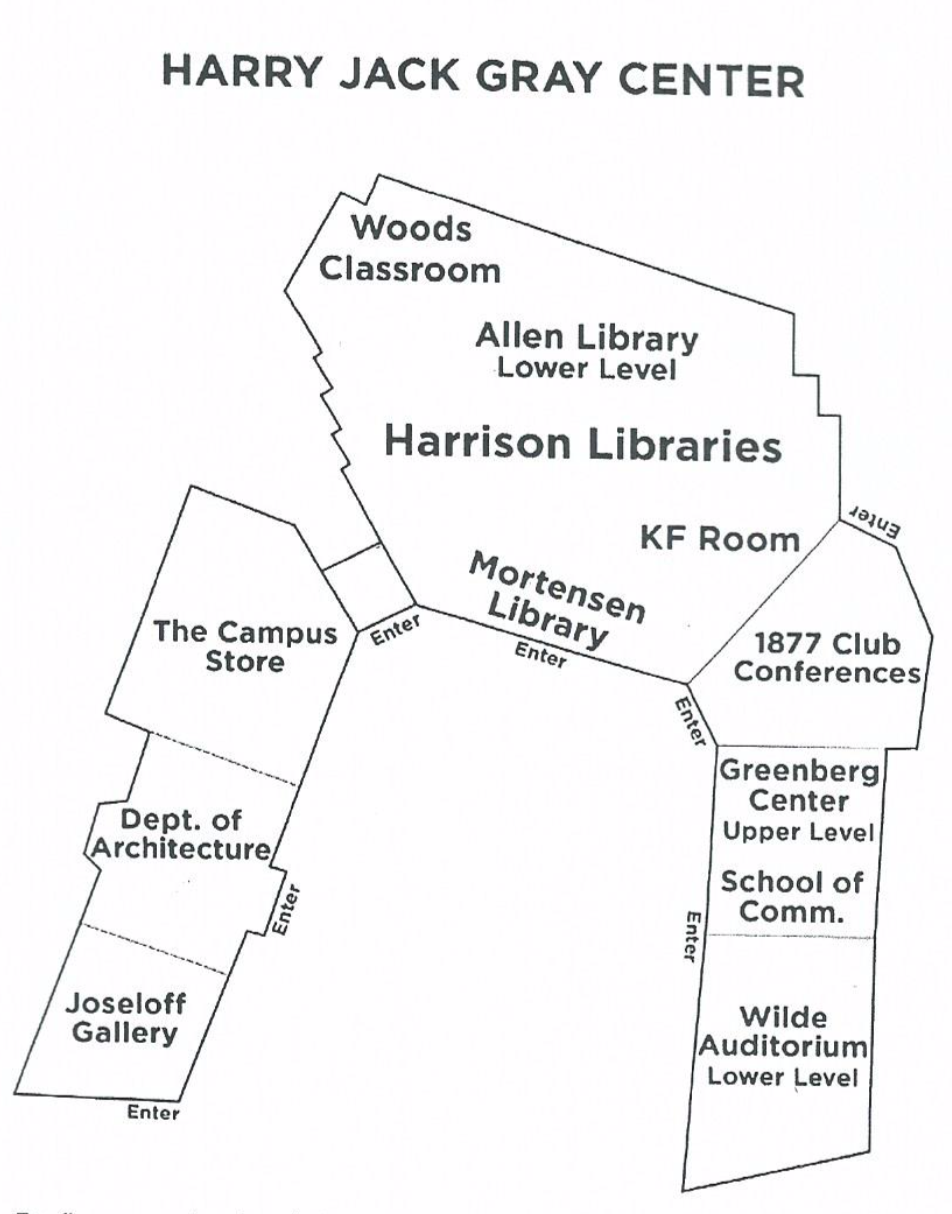
Course/Lecture Locations
The KF Room is located on the main level of Harrison Libraries within the U-shaped Harry Jack Gray Center. Enter at the center of the “U,” pass by the Circulation Desk on the right, and ascend three steps. The KF Room is on the right. Please dress in layers, as the temperature in KF can vary.
Wilde Auditorium is located in the lower level of the East wing of the Harry Jack Gray Center. Enter from either the main level or from the lower entrance across from Lot D. The lower entrance route has no stairs. Please dress in layers, as the temperature in Wilde Auditorium can vary.
Greenberg Center is a teaching venue on the upper level of the Harry Jack Gray Center, reachable through the 1877 Club or Wilde Auditorium entrance lobby. There is an elevator in the lobby.
Woods Family Classroom is located on the main level of Harrison Libraries within the Harry Jack Gray Center, Use the front entrance, pass by the Circulation Desk on the right, and ascend three steps. The Woods Classroom is located past the New Books shelves to the left.
Before the Semester Begins
- Choose course(s) and/or lecture(s) from list posted online; contact Chair with selections.
- Contact Co-Coordinator, if any, to plan course coordination efforts.
- Send Instructor Welcome Letter, personalized.
Approximately three weeks before course/lecture begins
- Request course enrollment list from Monica Mills.
- Send completed Parking Permit Request form to Ann Smith at Public Safety.
- Send Enrollees Welcome Letter, personalized; attach Parking Permit.
- Send Parking Permit to Instructor (if non-faculty).
- Attach, or send as soon as available, any supplementary reading assigned by Instructor.
- Work with library staff to place materials on hold shelf as needed.
Ten days before
- Request updated course enrollment list from Monica Mills.
- Send Enrollees Welcome Letter, personalized, to newest course registrants; attach Parking Permit.
- Attach, or send as soon as available, any supplementary reading to newest registrants.
- Follow up with Instructor to obtain phone number and answers to tech questions in Welcome Letter; provide to Randi Ashton-Pritting. Advise Instructor of current enrollment number.
- If any handouts need copying, get them to Randi Ashton-Pritting.
Five days before
- Repeat request to Monica for newest enrollment list.
- Follow Welcome procedure, above, for new names.
- Send reminder email to all course enrollees.
- Send reminder email to all lecture registrants (Duncaster, McAuley, Library).
A few days before
- Prepare Enrollment sheet from course/lecture enrollment list.
- Prepare Welcome remarks and Instructor introduction (create bullet points so Intro covers all).
At first class session/lecture (Arrive at least 30 minutes prior to class)
- Pick up lapel microphone from Circulation Desk (for KF Room) and any copies from Randi Ashton-Pritting.
- Greet Instructor; prepare room as required.
- Ensure tech-A/V equipment works to Instructor’s satisfaction.
- Take attendance (not at off-site lectures) and hand out materials. Welcome attendees, introduce Instructor.
- Deal with any unregistered attendees. Return KF microphone after class.
Subsequent sessions
- Attend class or arrange for a substitute.
- Repeat class protocol, as above, but without full Instructor intro.
- Take attendance.
- Final session: thank Instructor; encourage any who are interested in becoming Volunteers to get in touch with the Chair of Volunteers; solicit emails for feedback.
Following final session
- Write or email a thank you note to the Instructor. Bring written notes to Randi Ashton-Pritting.
- Gather feedback and email it to Director and to Volunteers Chair.
- Delete from your computer the course enrollment lists and all other personal information on attendees.